
Fluidit 2.9 Software Suite
This Fluidit release delivers a major step forward in data integration, usability, and modeling accuracy across all our software.
The most significant enhancement is the introduction of enhanced Data Connections, which enable direct linking of real-world measurement data to model components and allow simulation results to be written back to external systems. This strengthens Fluidit’s role as a digital twin platform, bridging operational data and simulation to enable better decisions and stronger return on modeling investments.
Business Impacts

Stronger Digital Twin & Data Integration Capabilities
- Direct integration with real-time and historical data sources (InfluxDB, JDBC, OPC UA)
- Ability to write simulation results back to operational systems
- Reduced manual data handling and improved data reliability

Improved Decision-Making with Better Visibility to Data
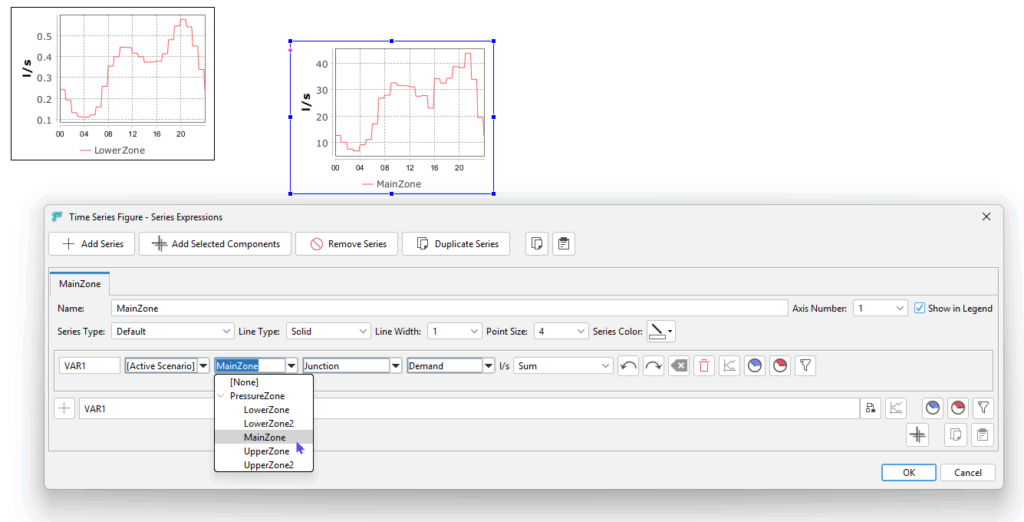
- Zone-level aggregated results (e.g., demand, energy use)
- Data accuracy shown visually (color-coded)
- Measurements integrated into result views

Increased User Productivity & Reduced Errors
- Dynamic schematics that auto-update with model changes
- Validation tools for data connections
- Prevention of common modeling mistakes (e.g., zero-length elements, visibility issues)
- Improved UI interactions and workflows

Enhanced Model Accuracy & Engineering Quality
- Improved pump curve handling (Water)
- Heat loss calculation automation (Heat)
- Advanced calibration tools (zone-based multipliers, % optimization ranges)
- New rainfall-runoff model (Storm)

Better Scalability and Performance on Large Datasets
- Fixes for freezing issues with large datasets and models
- Improved database handling and time series processing
- More stable scenario loading on extensive models

Expanded Use Cases (Design, Operations, and Optimization)
- Pipe sizing improvements (Heat)
- Calibration and optimization enhancements
- Integration with external systems
Product-Specific Updates
General Updates
Explore below the general updates that benefit our entire product range.
We have worked hard to provide a robust modeling platform for your daily operations and planning. We are proud to have implemented many of the updates our customers have been requesting.
As a Fluidit software user, you can find detailed descriptions of all updates on our Support Site.

Read more about this feature
Fluidit 2.9 Suite General Highlights
Data Connections
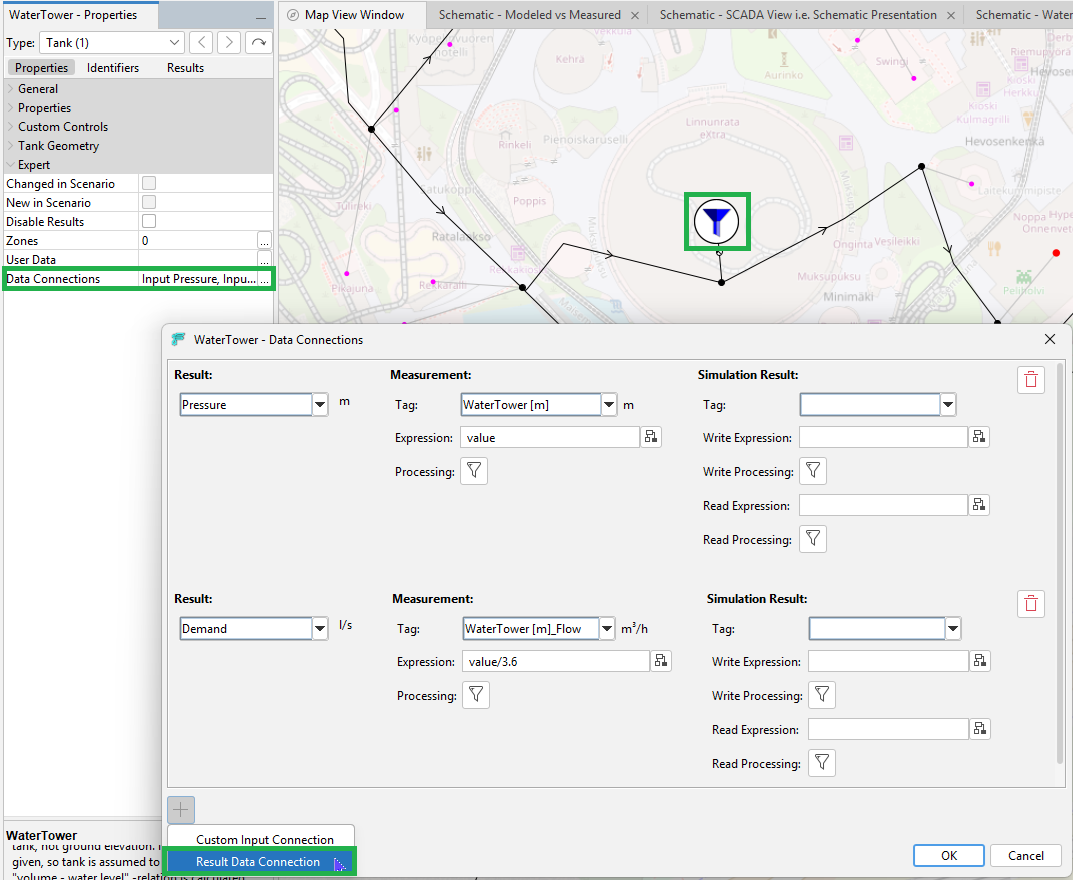
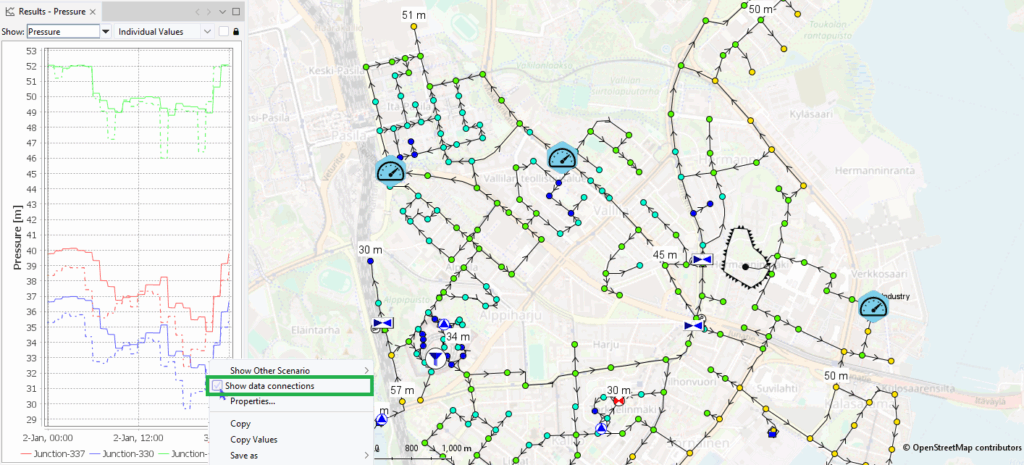
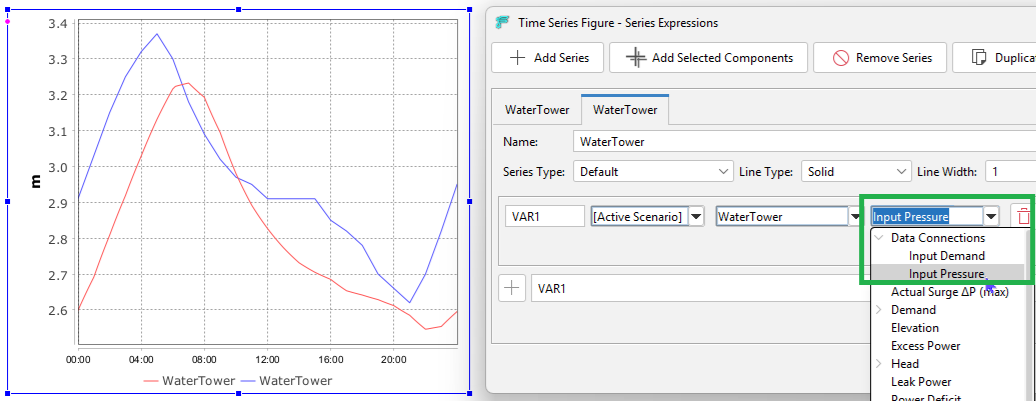
The new Data Connections feature is now available. Data Connections associates historical measurement data with modeled components. Although comparison of measurement data and model results was already available via Schematics, Data connections allow quick comparisons during your modeling work and facilitate the Schematic-building process later on.
- Pair historical measurement data (Data Source Tag or a Data Source Position) with modeled components.
- View connected data directly in results and schematics.
- Data Source Connections allow writing modeled results to Time Series and to some Data Sources (Influx Database, JDBC Data Source, Neuroflux Data Source, OPC UA Data Source).
- A validation tool for revealing data connection errors.
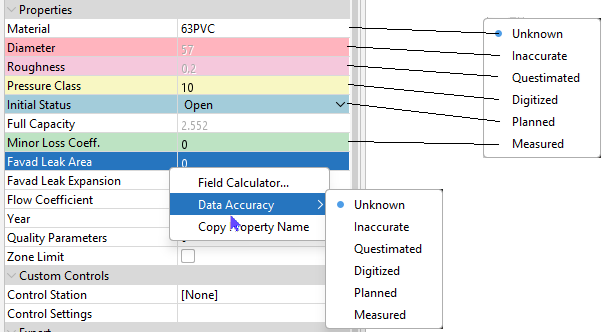
- Data flags can be flexibly used to indicate data quality (color-coded).
Optimize & Calibrate
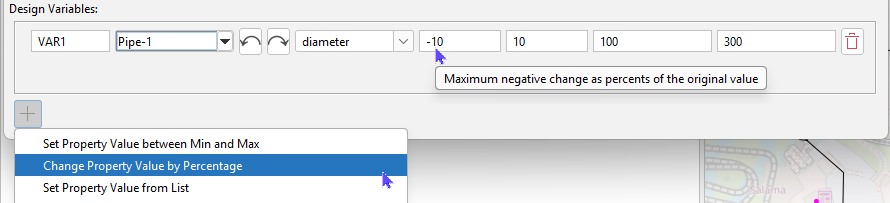
A new design variable for the Optimize & calibrate tool is now available. The tool can now optimize and calibrate scenarios by setting the search space by a percentage range (e.g., ±10%) of the existing value.
Time Series, Patterns and Curves
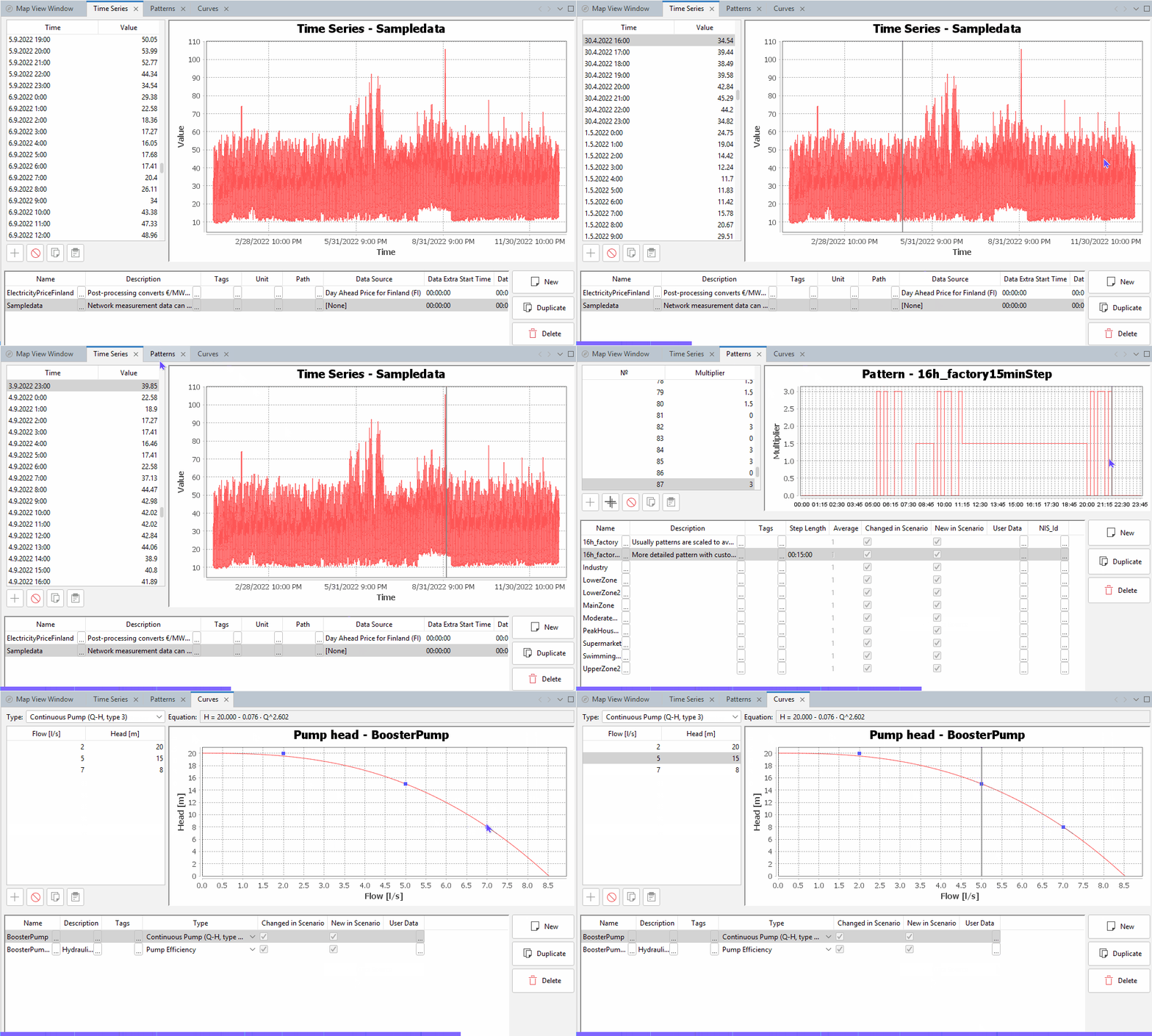
Time Series, Patterns, and Curves figures UI has been improved. Now, when users click the chart, the corresponding rows in the table will be highlighted. The pattern chart also now uses a visually appealing clock format instead of simulation steps.
Schematics
Read less about this feature

Fluidit Heat Updates
- An automatic tool for calculating heat transfer coefficients for pipes enables fast, easy calculation of heat loss coefficients for both single and twin pipes.
- Heat pumps for cooling demands are now available for cooling networks.
- Using velocity as a sizing factor in the Choose Diameters for Selected Pipes tool supports the pipe dimensioning process.
- Easier heat-loss calibration with Zone-based multipliers improves the calibration process.
- New drawing state package for pipe sizing.
- Improved Validator warnings and errors guide users to avoid modeling mistakes.
Read more about this feature
Fluidit Heat 2.9 Highlights
Material Designer
Heat losses are a key factor affecting the performance of district heating networks, so accurately representing them in the model is essential. In Fluidit Heat, the Material Library now includes a new tool, the Heat Transfer Coefficient Calculator, which enables calculation of heat transfer properties based on the defined pipe layer characteristics.
Heat Transfer Coefficient Multipliers
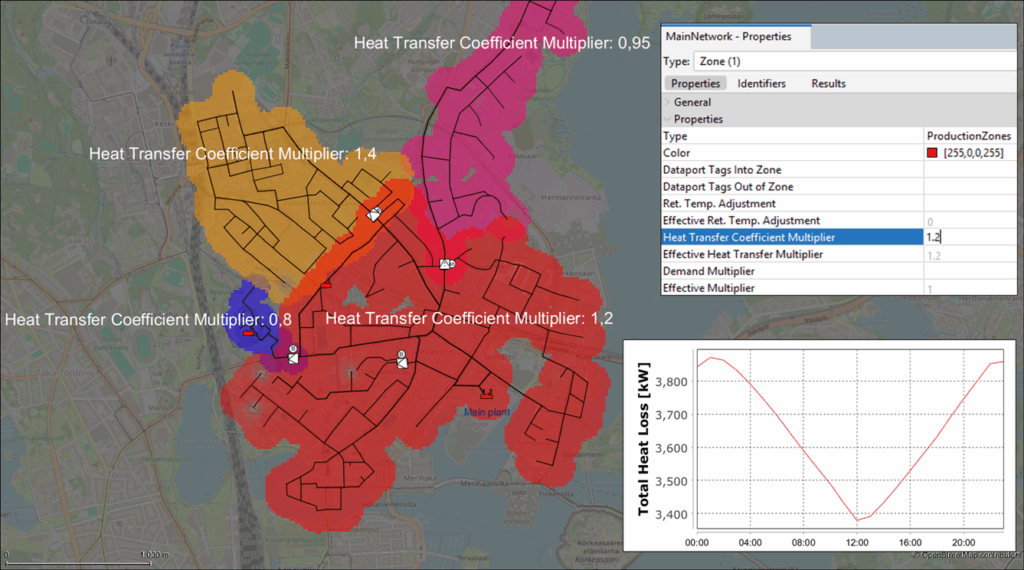
Fine-tune heat losses using zone-based heat-transfer coefficient multipliers.
District heating networks often contain pipe sections with similar nominal properties but different real-life thermal behavior. Pipes located in different areas of the network may have different ages, insulation conditions, or installation environments, leading to varying heat transfer coefficients and heat losses across the system.
With the Heat Transfer Coefficient Multiplier functionality in Fluidit Heat, a multiplier can be assigned to selected network zones to adjust the heat transfer coefficients of all pipes in those areas.
Benefits of this new functionality:
- Enables quick calibration of area-specific heat losses without manually modifying individual pipe properties.
- Provides a practical way to align simulated heat losses with real-world measurements while maintaining an efficient, flexible modeling workflow without unnecessary complexities.
Pipe Sizing
Fluidit Heat now provides an improved pipe-sizing process based on target velocity and unit head-loss constraints.
Read less about this feature
Fluidit Water Updates
- Data Connection facilitates connection to live data for integrated visualization and comparison with simulation results.
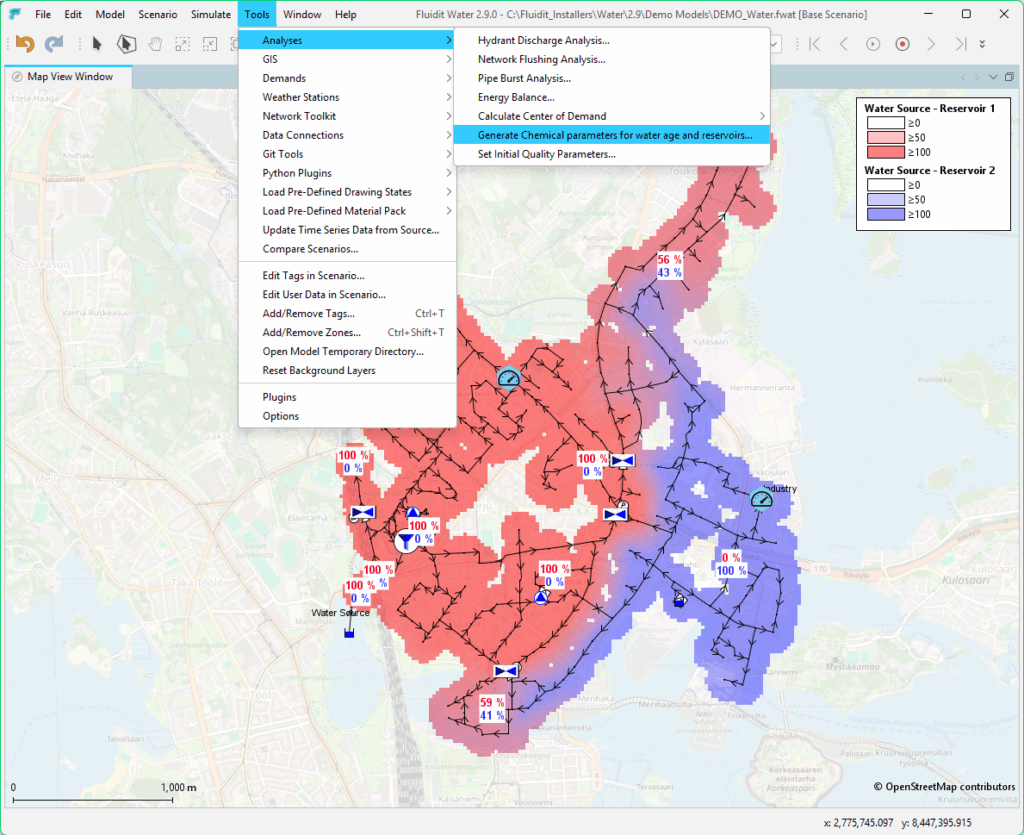
- New tool for generating water-source and water-age chemicals for selected/all reservoirs in the model.
- Pump behavior improved by a more realistic simulation of low flow.

Read more about this feature
Fluidit Water 2.9 Highlights
Data Connections
The new Data Connections feature is now available. Data Connections associates historical measurement data with modeled components. Although comparison of measurement data and model results was already available via Schematics, Data connections allow quick comparisons during your modeling work and facilitate the Schematic-building process later on. Read more about this and see examples in the General Updates section.
Generate Chemical Parameters
Read less about this feature

Fluidit Storm Updates
- New rainfall-runoff method added (NewUK).
- For UK users, new default background layers. Background Layers > right-click > UK Background Maps.
- Names displayed in the GUI and documentation were changed from “Catchments” to “Subcatchments”. This applies only to the GUI.
- Other developments that apply to all software, but are relevant to Storm users, can be found in the general release notes. For instance, showing measurements in result view windows and color-coded data accuracy.
Read more about this feature
Fluidit Storm 2.9 Highlights
UK Specific Updates
Fluidit Storm has been expanded to include the NewUK rainfall-runoff method, the built-in UK background maps, and various other adjustments to facilitate smooth usage in the UK. Features also provide better parity with other existing models in the UK market.
Fluidit users can find a detailed description in our Wiki: https://support.fluidit.com/projects/simulators/wiki/UK_Subcatchments
Read less about this feature
Learn More About Our Software
Heat

Plan and operate your district heating and cooling networks with maximum efficiency.
Water

Develop safe and sustainable municipal water supply networks with optimal design.
Storm

Mitigate combined sewer overflows and flood risks with a single modeling platform.
Sewer

Optimize and plan municipal separate sewer systems to ensure safe sanitation at city level.
Real-Time

Take your digital twins to the next level with real-time simulations.
Vision

Access and share your Fluidit models and visualizations with stakeholders effortlessly.
Customer Stories